M3U Tools IPTV Playlist Editor: mobile playlist cleanup and validation
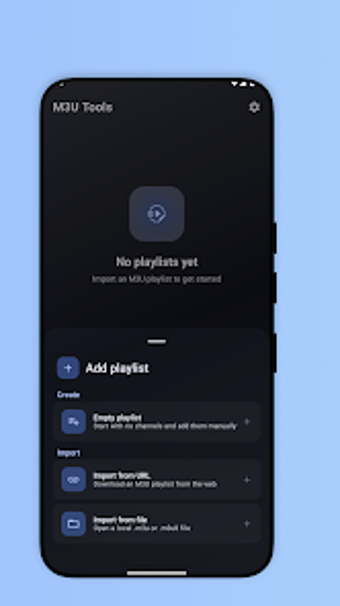
M3U Tools IPTV Playlist Editor, from Tiar Apps, is an Android utility for curating and repairing M3U and M3U8 playlists for IPTV users. It focuses on metadata editing and local-only playlist management to keep channel lists organized for playback. The app targets enthusiasts who want a mobile workflow for cleaning provider lists and keeping custom playlists private and device-resident without creating accounts.
What does M3U Tools actually handle?
The tool imports playlists from both local files and remote URLs, then exposes structured and raw editing modes so users can repair entries or make bulk changes. Key actions include merging multiple sources, removing duplicate channels, and exporting edited lists back to storage or sharing them with other player apps. Supported formats are M3U and M3U8, and the editor shows both a tree-style view and a raw text view for advanced fixes.
Does it slow down your device during playlist checks?
M3U Tools is built to cope with very large playlists and runs its link validation in the background, which keeps the interface responsive even when scanning thousands of entries. The developer notes optimization for devices with varying RAM capacities, and users can refresh URL-based lists without blocking other edits. Background checking and incremental updates reduce interactive wait time during routine maintenance.
Is it safe to manage playlists locally?
The app follows a privacy-first model: it operates without requiring accounts and stores all playlist data locally, so no automatic uploads occur. It also lets users preview remote-refresh results before applying changes, which limits accidental overwrites. Remember that M3U Tools is an editor, not a content provider, so users must supply legally obtained playlists before performing any modifications.
Do I need technical knowledge to use it correctly?
The interface offers a guided editor for basic corrections and bulk metadata edits, suitable for casual curators who want point-and-click fixes. For users comfortable with raw text, the raw view allows manual tag edits and precise control. The app includes drag-and-drop reordering, but advanced merging and manual text repairs benefit from some familiarity with M3U syntax.
Clear fit for hands-on curators who accept manual playlist sourcing
M3U Tools is a practical option for mobile IPTV curators who need reliable, local playlist maintenance; the trade-off is that the user must provide and manage source lists manually. For anyone prioritizing privacy and large-list handling on a phone or tablet, the app makes targeted playlist work straightforward. Recommended.